Public beta of Proxi 'shortcut software' available
[url=http://www.griffintechnology.com]Griffin Technology[/url], best known for their Mac and iPod hardware accessories, has released a public beta of Proxi, software that lets you create your own Mac OS X shortcuts. The final version will be out in May and will be a free download.
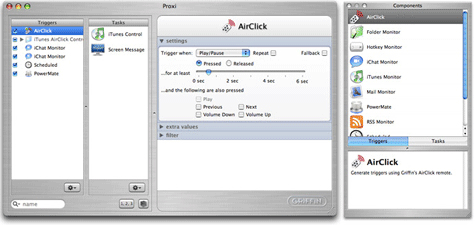 Proxi gives you a single interface within which you can configure several of your Griffin devices (such as the AirClick, PowerMate and RadioShark), define custom hot keys, monitor Mail, iChat, and RSS feeds, execute repeating tasks and more. For example, you can program your own applications for use with AirClick (and use it to control Front Row), use multiple PowerMates in a single application and fine tune RadioShark.
Proxi users the concepts of "triggers" and "tasks." A trigger is a Proxi component that sets in motion a task or series of tasks. A Task is a Proxi component that performs an action when triggered. A set of linked triggers and tasks, together, compose a Proxi "blueprint," a complete set of instructions that tells Proxi how to perform a task. The software comes with a library of useful Blueprints to get you started. Triggers and tasks can be configured in unlimited combination.
When you develop a useful blueprint, you can share it. Proxi features a Blueprint Browser, which is continually updated with new blueprints. You can also join in the Proxi community, share new Blueprints, Tasks and Triggers, and get support and tips on the Proxi Support Wiki. In fact, you can submit your BluePrints to the Proxi Support board; if they're chosen, Griffin will reward you with some of its products and possibly add your submission to the Blueprint Browser built into Proxi.










