The leap forward OS X made in this area is impossible to overstate. Even mention of the initials "JLK" (Japanese Language Kit) is enough to unsettle the stomach of Mac old hands here. With Systems 7 and 8, the English-speaker in Japan had three choices: an English language OS, a Japanese language OS, or an English language OS with the JLK. Beginning with OS 9, Apple also sold "International" versions of the OS, which was basically the English OS with the JLK pre-installed. Macs running either of those first two configurations ran just like any other contemporary Mac, obviously. The Japanese OS was a bit bulkier - all the characters, plus the conversion code -- but it was just as (un)stable as its English language counterpart. However, using the Japanese OS meant actually knowing how to read Japanese, a challenge many of us were not quite up to.
What many did, then, was to patch the JLK onto the English OS. It worked, kind of. It added the Japanese fonts and characters, allowed you to toggle between languages with a simple key combo. With some applications, anyway -- the ones that didn’t offer up screensful of undecipherable gibberish known here as mojibake. One could even get it to work with some versions of Wordperfect, and there was an ingenious plug-in that allowed Eudora users to handle Japanese email on an English OS. Most of the time. Oh, and it meant crashing and restarting several times a day. One soon got I the habit of ending every paragraph with CMD-S. For many of us, the hardship of the JLK provided sufficient incentive to learn Japanese well enough to function in an all-Japanese computing environment. You might think I exaggerate, but when working with a colleague here in 1997 on a book-length document (an Internet English textbook), fully 25 percent of our late-night early-morning working time was spent waiting for his otherwise bullet-proof 604e to restart. Not much nostalgia there.
At the same time, even these circumstances were cause for envy in the Windows world. At least Mac users could have a single machine and install either an English or Japanese OS, or both, using a partitioned hard drive or an external bootable SCSI drive; Windows users here either bought a Japanese machine and Japanese OS here, or shipped/packed a English machine-OS combination form overseas. No installation of an English OS on a Japanese machine allowed, or vice versa. To be fair, when Microsoft released Office 98, all it’s components worked extremely well with the Japanese language.
Perhaps a short explanation of the multi-lingual input methods would be helpful. To toggle between different languages one uses a simple key combination, usually CNTRL-Spacebar. When using Japanese, one then types in the phonetic transcription of the word, for example, "sayonara." The corresponding Japanese syllabic characters appear, underlined in red. One can accept the spelling as is, or, by using the space bar, search a list of likely Chinese character (kanji) representations of the word. This input method remains unchanged from the days of the JLK, and has been the standard for Japanese language input for some time. (See what I mean?)
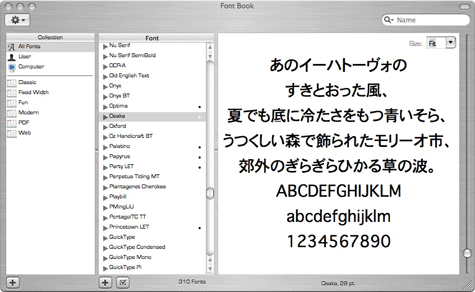
Shown above is a look at one of the Japanese font sets in Font Book.
Enter OS X. Even in its beta form, the foreign language paradise it offered made it my default platform as soon as there were applications to run on it. Right out of the box, OS X is mind-bogglingly multi-lingual. When installing, it asks you to choose the main language from a list that includes languages I’ve never heard of. For a peek of all that is there, see what comes up in the International Preference Pane or Font Book (/Applications). And don’t get me started on the beauty of the font rendering with the Aqua graphics. All the fonts are there, all the hooks for any app developer to grab and use for menus and dialog boxes, etc. Once you’ve chosen your main language, you can use others as well, toggling between them with the CMD-SpaceBar key combo. Dead stable. I can run English language apps, I can run Japanese language apps; OS X just handles it. It just works.
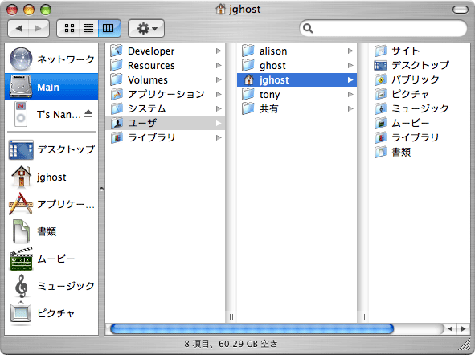
The graphic shows the computer itself assigned a mail language. However, but each user can have his or her own.
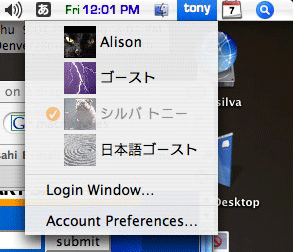
In the graphic at the right: switching the system’s language is made easy when Fast User Switching is enabled.
It gets better. With OS X’s basic multi-user operations, you can have a different main language for each user. Multi-cultural couples can share a computer with each partner working in his/her native language. I can see how my project will look on a Japanese language OS.
And, in case you were wondering, yes, my friends with Windows machines still need to decide whether to buy a Japanese language machine/OS here or pay a premium for an imported English language machine/OS. Is it wonder why Macs are so popular here?
So, while not even OS X can make the Japanese language any easier to learn, it has been a sanity and life saver for the Mac user in a multi-lingual environment. The transparency and ease of multiple languages, and even across platforms that many new users take fro granted, as recently as six years ago were unrealistic fantasies.
For those of you who might have an interest in exploring the multi-lingual ability of OS X, or, at least its Japanese side, I’ll share a few of the tools that I’ve found handy. [url=http://jedict.com/]JEDict[/url] is probably the best J-E/E-J dictionary I’ve come across. It provides access to several dictionaries and has a rough kanji-reading capability. Before I found JEDict, I used [url=http://homepage.mac.com/andrewlindesay/le/]WordLookup[/url], which offers dictionaries for a whole slew of other languages. Both of these work while offline. Live Dictionary works with Safari to translate words on web pages; you can set the preferences for it to translate words on mouseover or with a key combination. A great timesaver if you do a lot of foreign language browsing. [url=http://www.kavasoft.com/TranslationService/>]Translation Service[/url] lives in the Services section of the application menu bar. It will attempt to translate selected text to a number of languages. It’s registration is rather restrictive (one machine only) and it doesn’t work with some applications (including Word). Lastly, for Japanese language study, the [url=http://www.yookoso.com/]Yookoso! (Welcome!) site[/url] offers all kinds of word/grammar/kanji-a-day helpers online or via email subscription.
*よã‚ã—ããŠããŒã„ã—ã¾ã™ is a common phrase used in introductions, the equivalent of "How do you do?" but more literally translated as "I will be in your debt if you take care of me." But that’s grist for another article of its own.










