More on iTunes
Apple begins this segment with FIG. 33 which simply describes a method "performed on a computing device having a display and a touch sensitive input device such as a touch screen." The interface method 900 begins at block 902 where a list of songs are displayed. FIG. 34A [above] shows one example of a window 930A including a list of songs 932A, and FIG. 35A shows another example of a window 930B including a list of songs 932B. FIG. 34A may, for example, be a graphical user interface displayed on an iPod.RTM. manufactured by Apple Computer of Cupertino, Calif., and FIG. 35A may for example be a graphical user interface associated with a music management program, such as iTunes.RTM - manufactured by Apple Computer of Cupertino, California.
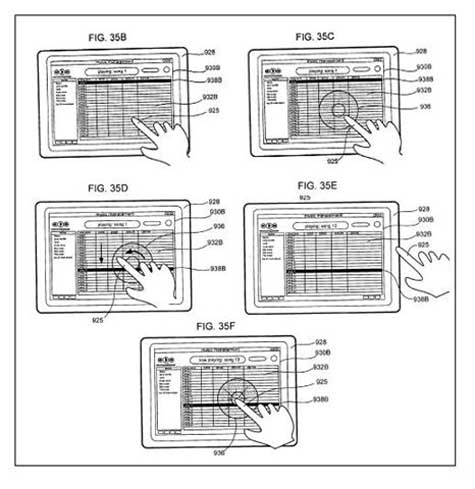
Following block 902, the user interface method 900 proceeds to block 904 where a touch is detected over the displayed list of songs (or window or entire GUI). This may be accomplished with the touch sensitive input device when an object such as a stylus or one or more fingers is placed on the touch sensitive surface of the touch sensitive input device such as a touch screen. FIGS. 34B [above] and 35B [below] show a finger 925 placed over the window 930 including the list of songs 932.
Once a touch is detected, the user interface method 900 proceeds to block 906 where a virtual scroll wheel is activated. That is, a virtual scroll wheel is displayed in addition to the list of songs and its functionality is enabled. In essence, because the song list was touched, a scroll wheel that allows a user to traverse through the songs in the list of songs is provided. In some cases, the virtual scroll wheel displaces the media items, i.e., the media items are minimized or shifted to make room for the virtual scroll wheel. In other cases, the virtual scroll wheel is positioned or laid over the media items (the media items keep their current size, shape and position). The virtual scroll wheel can be made semi-transparent so that the media items can be viewed through the virtual scroll wheel. FIGS. 34C and 35C show a transparent virtual scroll 936 wheel laid over the window 930 including the list of songs 932. Alternatively, a virtual slider bar may be displayed.
Once displayed, a determination 908 is made as to whether or not a scrolling touch event (or gesture) is performed relative to the virtual scroll wheel. For example, whether or not a finger is positioned over the scroll wheel and whether or not the finger is moved around the scroll wheel in a swirling fashion.
If a scrolling touch event is performed by the user, the user interface method 900 proceeds to block 910 where scrolling is implemented through the list of songs in accordance with the scrolling touch event. By way of example, a selector bar may be moved from one song to another as the finger is swirled around the virtual scroll wheel. FIGS. 34D and 35D [above] show the finger 925 swirling around the virtual scroll wheel 936, and a selector bar 938 moving linearly through the list of songs 932 in accordance with the swirling finger 925. In the illustrated embodiments, the selector bar is moved linearly up when the finger is swirled in a clockwise fashion and linearly down when the finger is swirled in a counterclockwise fashion. It should be noted, however, that this is not a limitation. For example, the selector bar may moved linearly down when the finger is swirled in a clockwise fashion and linearly up when the finger is swirled in a counterclockwise fashion.
If a scrolling or select touch event is not performed, the user interface method 900 proceeds to block 916 where the virtual scroll wheel is deactivated. That is, the virtual scroll wheel is disabled and removed from the display. FIGS. 34E and 35E show the display 928 without the virtual scroll wheel 936. Although the virtual scroll wheel 936 is removed, changes made to the list of songs, i.e., the position of the selector bar 938, typically remain.
 Neo's Note - Take special note of FIG. 38J below:
In addition, multiple GUI elements can be activated in the same portion. For example, as shown in FIGS. 38I and 38J, if the user selects a particular box 990 in the playlist 964, a keyboard 992 may be activated so that the user can enter data associated with the song (e.g., title, artist, genre, etc.). If the scroll wheel 962 is active at the same time as the keyboard 992, the scroll wheel 962 may be minimized to accommodate the keyboard 992 as shown. Once the keyboard 992 is deactivated, the scroll wheel 962 reverts back to its original size.
In some cases, the virtual scroll wheel may include button zones across its surfaceor a virtual button at its center or around its sides. The buttons and button zones may for example correspond to menu, play, seek, pause, and/or the like. In this particular embodiment, the method described above may include additional steps that occur before block 416. For example, if a scrolling touch event is not performed, the user interface method 900 may include an additional block where a determination is made as to whether or not a selection touch event (or gesture) is performed relative to the virtual scroll wheel. The selection touch event may be implemented by tapping the button or by exerting increased or decreased pressure on the button rather than swirling around the surface of the virtual scroll wheel (see FIGS. 34F and 35F). If the button is a song select or enter button, the method include another block where the song with the selector bar disposed thereover is selected. That is, when the virtual button is tapped, or otherwise selected, the song currently covered by the selector bar is played and outputted for the user's enjoyment.
If a first set of conditions are implemented, the method proceeds to block 956 where a first GUI element is activated. For example, as shown in FIGS. 38A-B, in an active window 960 of a music management program, a scroll wheel 962 may be activated when a user touches a playlist portion 964 of the active window 960.
If a second set of conditions are implemented, the method proceeds to block 958 where a second GUI element is activated. For example, as shown in FIGS. 38B-C, in the active window 960 of a music management program, a music control panel 966 may be activated when a user also touches a border 968 of the active window 960. Although they work independent of one another, the first and second GUI elements may be activated at the same time if the first and second conditions occur simultaneously (FIG. 34C).
Following block 956, the method proceeds to block 960 where it is determined if the first GUI element should be deactivated. If so, the method proceeds to block 962 where the GUI element is deactivated. For example, as shown in FIG. 38D, the first GUI element (scroll wheel 962) is disabled and removed from display when the finger 925 is no longer detected over the playlist 962. If not, the method maintains block 956.
Similarly but independently, following block 958, the method proceeds to block 964 where it is determined if the second GUI element should be deactivated. If so, the method proceeds to block 966 where the GUI element is deactivated. For example, as shown in FIG. 38E, the second GUI element (control panel 966) is disabled and removed from display when the finger 925 is no longer detected over the border 968. If not, the method maintains block 958.
It should be noted that the method is not limited to only two GUI elements and that other GUI elements may be activated if other conditions are implemented. For example, a third GUI element may be activated when a third set of condition occurs and so on. By way of example, as shown in FIG. 38F, the user may slide their finger 925 from the border 968 to a menu portion 970 of the active window 960 thereby initiating a change from the control panel 966 to a scroll wheel 972 (e.g., while the second GUI element is being deactivated, the third GUI element is being activated).
Further, as shown in FIG. 38G, the user may add another finger 925 to the current touch thereby initiating a change from the first control panel 966 to a second control panel 982. The first control panel 966 may include a first set of control options such as play, stop, seek and volume options and the second control panel 982 may include a second set of control options such as song playing order, song information, [and] light effect options.
 Touch display for iPhoto
From iTunes, the series of patents also include a reference to working with photos on a touch display. Obviously this is in reference to Apple's iPhoto.
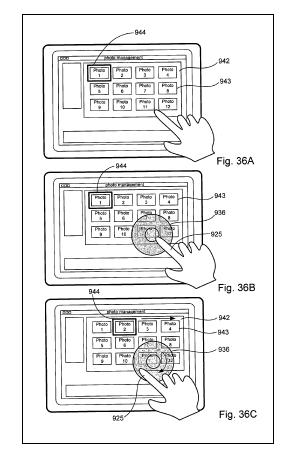
The patent states that "It should be noted that the methods described above are not limited to scrolling through a list of songs. Any media item as well as any group of elements can be scrolled through using the aforementioned technique. For example, in photo layout 942 as shown in FIGS. 36A-36C, the virtual scroll wheel 936 may appear when the user places their finger 925 over the photo layout 942 (or grouping), and thereafter it can be used to move a highlighter 944 through the various photos 943 in the layout 942. By way of example, the photos may be thumbnails images that make traversing through a large number of images easier."
Touch display for an ebook
One of the patents within the series presents an ebook application. The text in the illustration below is too small to see the page numbers presented. Figure 1 represents page 1 and Figure 21B represents page 2.
The patent illustration is "a diagram of a GUI operational method in accordance with one embodiment of the present invention. The GUI operational method is configured for initiating a page turn. The GUI operational method generally begins at block 602 where a page from a multitude of pages is displayed in a GUI. By way of example, the pages may be associated with an electronic book.
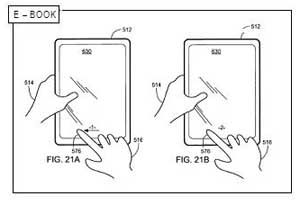 Furthermore the patent states that "The translation is configured to simulate a finger turning the page in an actual paper bound book. The direction of the translation indicates whether to go to the next page or previous page in the list of pages. For example, if the finger is swiped right to left, then a page back signal is generated, and if the finger is swiped left to right, then a page up signal is generated.
Additionally, "This GUI operational method may be enhanced several ways. For instance, if multiple fingers are swiped, then this may create a paging signal greater than one page. For example, a two finger swipe equals two page turns [and a] three finger swipe equals three page turns, etc. Then interestingly the patent provides a hint that the user could program turn paging so that two or more fingers could represent page-leaps. The patent states that " Or a two finger swipe equals ten page turns, three finger swipe equals 50 page turns, etc. This can be performed repeatedly to whisk through the group of pages.
NOTICE
Macsimum News presents only a brief summary of patents with associated graphic(s) for journalistic news purposes as each such patent application and/or grant is revealed by the U.S. Patent & Trade Office. Readers are cautioned that the full text of any patent applications and/or grants should be read in its entirety for further details.
Neo's Notes
Since the fall of 2004 we began to read about a wireless Tablet patent filing from Apple out of the U.K. and more patent news has come to light since that time. The fact that this new series of patents are demonstrating applications for the tablet such as iTunes and so forth, we could take heart that this project is progressing to a point that would suggest we could be close to seeing this technology come to light very shortly. Whether this involves a new Apple mobile OS or simply an extension of Tiger or Leopard remains to be seen.
No matter what form it takes, it’s simply another part of Apple’s long standing vision to take us all to "The Next Wave of the Internet!"
Have an opinion? Email me at - neo@macsimumnews.com










