Apple's abstract
A method of operating a touch screen to activate one of a plurality of virtual keys is provided. A touch location is determined based on location data pertaining to touch input on the touch screen, wherein the touch input is intended to activate one of the plurality of virtual keys. Each of the plurality of virtual keys has a set of at least one key location corresponding to it. For each of the virtual keys, a parameter (such as physical distance) is determined for that virtual key that relates the touch location and the set of at least one key location corresponding to that virtual key. The determined parameters are processed to determine one of the virtual keys. For example, the determined one virtual key may be the virtual key with a key location (or more than one key location, on average) being closest to the touch location. A signal is generated indicating activation of the determined one of the virtual keys.
Background
A touch screen is a type of display screen that has a touch-sensitive transparent panel covering the screen. When using a touch screen, a user makes a selection on the display screen by pointing directly to GUI objects on the screen (usually with a stylus or finger). The GUI objects may be considered as virtual keys (for example, of a keyboard). It is desirable to increase the usability of display screens for activating virtual keys.
Summary
In accordance with one aspect, a method of operating a touch screen to activate one of a plurality of virtual graphical user interface (GUI) items is provided. A touch location is determined based on location data pertaining to touch input on the touch screen, wherein the touch input is intended to activate one of the plurality of virtual GUI items. Each of the plurality of virtual GUI items has a set of at least one item location corresponding to it. For each of the virtual GUI items, a parameter (such as physical distance) is determined for that virtual GUI item that relates the touch location and the set of at least one item location corresponding to that virtual GUI item. The determined parameters are processed to determine one of the virtual GUI items. For example, the determined one virtual GUI item may be the virtual GUI item with an item location (or more than one item location, on average) being closest to the touch location. A signal is generated indicating activation of the determined one of the virtual GUI items.
[0005] In accordance with another aspect, a method of operating a touch screen to activate one of a plurality of virtual keys is provided. Thus, for example, the virtual keys may be considered specific examples of virtual GUI items. A touch location is determined based on location data pertaining to touch input on the touch screen, wherein the touch input is intended to activate one of the plurality of virtual keys. Each of the plurality of virtual keys has a set of at least one key location corresponding to it. For each of the virtual keys, a parameter (such as physical distance) is determined for that virtual key that relates the touch location and the set of at least one key location corresponding to that virtual key. The determined parameters are processed to determine one of the virtual keys. For example, the determined one virtual key may be the virtual key with a key location (or more than one key location, on average) being closest to the touch location. A signal is generated indicating activation of the determined one of the virtual keys.
Weights may be associated with each key location, and the weights may be adjusted dynamically based on a sequence of virtual keys previously activated and, in some examples, also based on external considerations such as statistical probabilities of particular virtual keys being activated (based, for example, on dictionaries or letter occurrence frequency data).
In one example, a dictionary lookup is used, and all of the letters of a word are considered in doing the dictionary lookup. In other examples, an "x" (e.g., 4) letter rolling window is considered. Thus, for a word that is (or is, thus far) less than or equal to "x" letters, the entire word is used in the dictionary lookup. Once the "x" letter window is full, only the "x" letters are considered. This can reduce the amount of processing relative to considering greater than "x" letters. In addition, a hybrid approach may be used. For example, a dictionary lookup may be used (perhaps with a relatively small dictionary) initially and, if the word is not in the dictionary, then the letters of the rolling window is considered. In some examples, the positioning of the letters in the words (particularly, but not limited to, at the beginning of a word) is considered. In one example, this is accomplished by considering "space" as the first letter of a word. Furthermore, in some examples, the frequency of occurrence of a word (e.g., within a particular document) may be used as input for adjusting the weights.
Activating the virtual keyboard
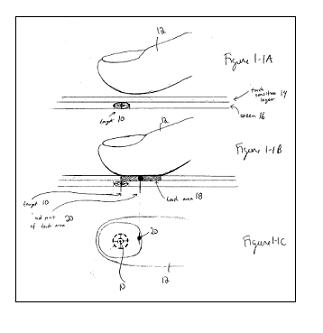
The touch screen provides a graphical user interface that includes GUI items that can be activated by the user as input to the program operating on the computer system. As can be seen from FIG. 1-1A, 1-1B and 1-1C, the touch area of a user's finger, to activate a GUI item on a touch screen, typically does not match a visual target associated with that GUI item. FIG. 1-1A shows a finger 12 approaching the touch-sensitive layer 14 of the touch screen. FIG. 1-1A also shows a visual target 10 displayed on the screen 16 of the touch screen. FIG. 1-1B shows the finger 12 touching the touch sensitive layer 14. It can be seen from FIG. 1-1B that the finger 12 contacts the touch sensitive layer 14 at a touch area 18. The mid-point 20 of the touch area 18 does not match the visual target 10 displayed on the screen 16 of the touch screen. FIG. 1-1C shows a plan view of the finger 12, visual target 10 and mid-point 20 of the touch area 18. FIG. 9 illustrates, in plan view, a situation where a finger 902 is being used to potentially activate two somewhat small GUI items, a keep GUI item 904 and a delete GUI item 906.
It is desirable to process touches on a touch screen in a way that does not necessarily depend on a match between the visual target 10 and a touch area of a touch to activate a GUI to which the visual target 10 corresponds. It is desirable to process touches on a touch screen in a way that "makes sense," which may include considering factors beyond (or instead of) a correspondence of the visual target and the touch area of a touch to activate the GUI to which the visual target corresponds.
Not limited to virtual keyboards
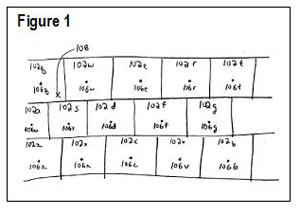
In one example, the GUI items are virtual keys of a virtual keyboard. FIG. 1 illustrates a portion of a touch screen, where the gridlines 104 are displayed to the users, visually defining "keys" that are present on a conventional QWERTY keyboard. The shapes and locations of the visually-defined keys need not be operationally correlated to the shapes of the virtual keys. This will be seen later, particularly with reference to FIG. 7. The visually-defined keys are labeled in FIG. 1 as 102q, 102w, 102e, etc., to indicate the letter to which each key corresponds on a conventional QWERTY keyboard.
Each of the plurality of virtual keys has a set of at least one key location corresponding to it. The dots 106q, 106w, 106e, etc indicate key locations. In the FIG. 1 example, each set of key locations (corresponding to a separate virtual key) is a set of one key location. Later, sets of key locations are illustrated that include more than one key location.
In FIG. 1, a touch location is denoted by the "X" 108. In accordance with a broad aspect, a parameter is determined for each virtual key that relates the touch location to the set of at least one key location corresponding to that virtual key. The determined parameters are processed to determine one of the virtual keys, and a signal is generated indicating activation of the determined one of the virtual keys.
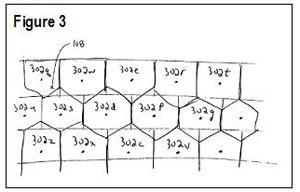
Having described a particular example of a virtual key activation method, we now refer to the illustration in FIG. 3. The hexagonal shapes 302q, 302w, 302e, etc. illustrate an example of the shapes of the virtual keys, superimposed on the visually-defined keys 102. The example touch location "X" 108 shown in FIG. 1 is also shown in FIG. 3. Typically, the hexagonal (or other) shapes of the virtual keys would not be displayed to the user. Generically, the particular configuration of each virtual key 302 is based on the number and configuration of the key locations in the set of key locations corresponding to the virtual key. Other example configurations will be described later.
Boundaries of the virtual keyboard
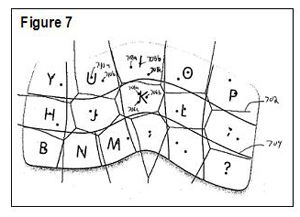
FIG. 7 illustrates a portion of a virtual keyboard. The lines 702 indicate the boundaries of the virtual keys, whereas the lines 704 indicate the key boundaries as displayed to the user on the touch screen. The "dots" (for example, 706a, 706b and 706c; 708a, 708b and 708c; and 710a and 710b) are not typically displayed but, rather, indicate key locations for the virtual keys.
In some examples, rather than strictly considering distance between a touch location and key locations, statistical parameters of the distribution of the key locations is taken into account. Thus, for example, a touch location that is "closer" in standard deviation terms to the distribution of key locations for a first virtual key than to the distribution of key locations for a second virtual key is considered to correspond to an activation of the first virtual key. Thus, in one example, a first virtual key has corresponding to it a relatively closely-spaced distribution of key locations, relative to the distribution of key locations corresponding to a second virtual key. With these example distributions of key locations, in order for a touch location to correspond to activation of the a touch location would have to be relatively closer (in physical distance) to the center of the relatively closely-spaced distribution of key locations corresponding to the first virtual key than to the center of the distribution of relatively further-spaced key locations corresponding to the second virtual key.
Thumb activated virtual keyboard
The described examples may be particularly useful where the virtual keyboards are small relative to the touch area with which a user may activate a virtual key. With a conventional keyboard (with which, for example, it is determined that a particular virtual key is activated by determining if the touch area is within a boundary corresponding to that virtual key), the touch area may correspond to more than one virtual key.
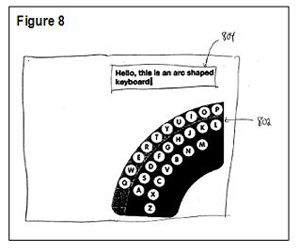
For example, FIG. 8 illustrates an example of an arc-shaped keyboard that may be particularly suited for thumb activation of the relatively small and close- together virtual keys. The visual display 802 associated with the FIG. 8 keyboard, as well as (nominally) the layout of the key locations used to determine which virtual key is activated) is arc-shaped. An output area 804 is also shown, which provides an indication of the activated virtual keys.
The thumb, for example, is relatively large and difficult to control. The arc-shaped keyboard may be initiated by a particular gesture such as "swiping" the thumb across a corner of the touch screen. The arc-shaped keyboard may be, for example, located in a corner of the touch screen easily reachable for activation of the virtual keys by a thumb of a hand holding the touch screen computer.
Notice
Macsimum News presents only a brief summary of patents with associated graphic(s) for journalistic news purposes as each such patent application and/or grant is revealed by the U.S. Patent & Trade Office. Readers are cautioned that the full text of any patent applications and/or grants should be read in its entirety for further details. Please refer to patent 20060085757.
neo@macsimumnews.com
Related patent: [url=http://www.macsimumnews.com/index.php/archive/ apple_files_yet_another_touch_screen_patent/]"Apple files yet another touch screen patent"[/url]










